
Read an AI agreement summary
See each agreement's live position in RebateLedger Smart — booked volume, current slab and rate, money claimed, settled and pending, plus an AI summary.
A rebate agreement holds a lot of detail, and reading it all to understand how it's doing takes time. The Smart agreement summarizers give you each active agreement's facts at a glance — calc basis, validity, slab structure, live claim activity — plus a live position and a money strip, without you assembling it yourself.
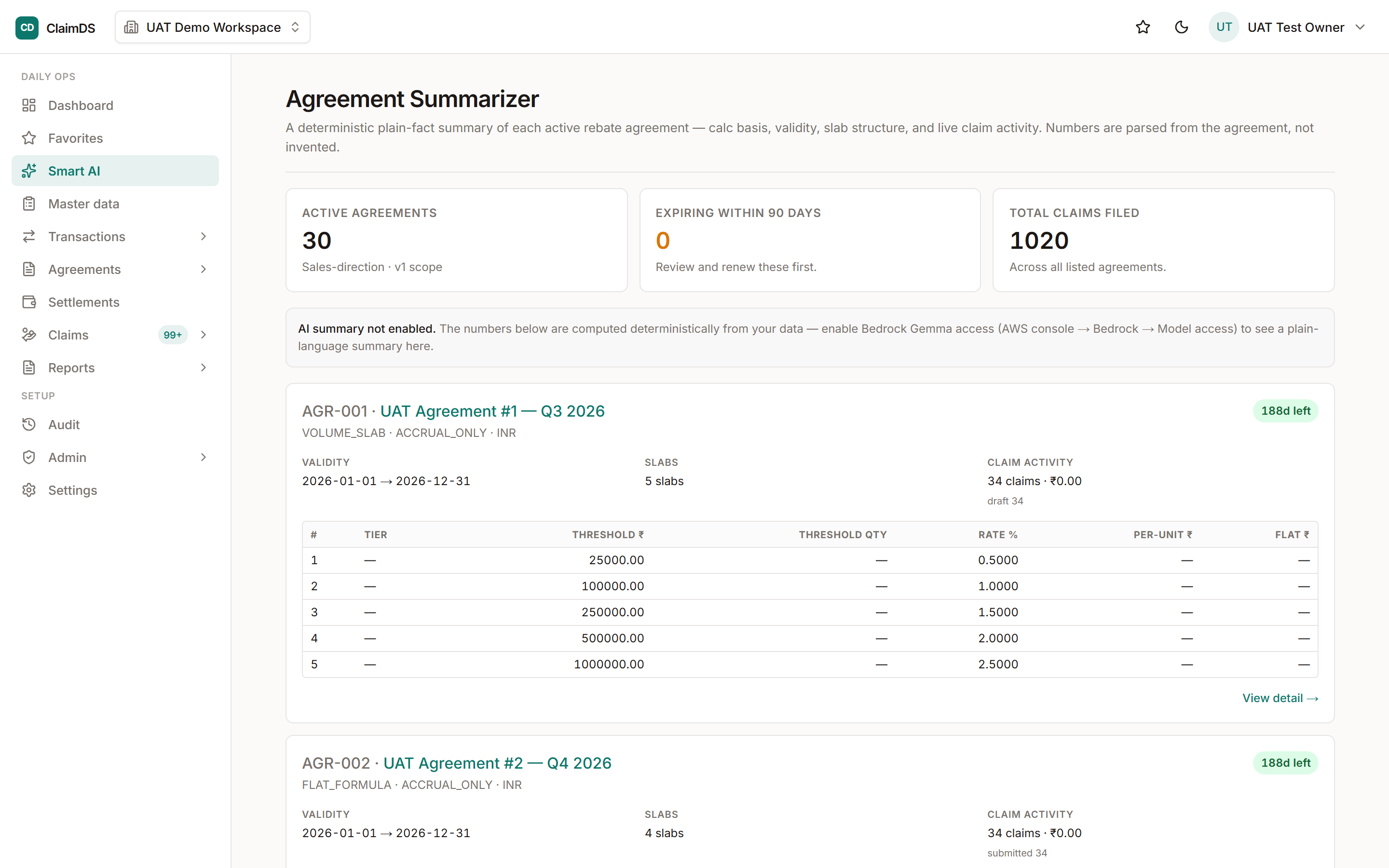
Smart AI → Agreement Summarizer: each active agreement's performance at a glance.
Your live position, per agreement
For agreements built on volume slabs, each card shows where you stand right now:
- Booked in the window — the volume (value or quantity) booked inside the agreement's validity window, before any scheme eligibility rules are applied.
- Current slab and rate — the slab you sit in today, with its rate, per-unit amount or flat reward. Slab boundaries follow the calculation engine's convention — each slab runs up to (but not including) its own threshold — so before any threshold is crossed you are simply in the first slab.
- Distance to the next slab — how much more you need to reach the current slab's exit threshold, or a note that you're already in the top slab.
For example, if a dealer scheme pays 2% up to ₹50 lakh and 3% beyond, and ₹42 lakh has been booked so far, the card shows you sitting in the 2% slab with ₹8 lakh to go before the 3% rate kicks in.
Not every agreement gets a position, and the card is honest about why. Scheme shapes without volume slabs show "position not applicable"; agreements with no enrolled counterparties show "position unavailable". No invented numbers either way.
The money strip
Below the position, every agreement carries a compact money line — claimed (total claims filed against the agreement, in any state), settled (paid through committed settlement runs), and pending — the claims that are claimed and not yet settled, counting live claims only: rejected, cancelled and recovered claims can never settle, so they are left out of the pending figure.
Sales and purchase sides
There are two summarizers, both in the Smart AI hub:
- Agreement Summarizer — your sales-side agreements, the rebate schemes you pay out.
- Purchase Agreement Summarizer — the purchase agreements under which you receive rebates from your brands and principals. It mirrors the sales view — same slab tables, live position and money strip — for the other direction of money.
Numbers you can trust, words when you want them
Every figure — booked volume, slab position, claimed, settled, pending — is computed deterministically from your own data, exactly as elsewhere in Smart. When AI narration is enabled, a plain-language summary sits on top and explains what the numbers mean; when narration is off, the summary is simply absent and every number still computes and displays as usual. The words are optional. The math never is.
Read a summary
Follow the numbered steps below. To see the agreement behind the figures, open it directly — see the agreement lifecycle for what each stage means.
Step-by-step
Open a summarizer in the Smart AI hub
Open Agreement Summarizer for your sales-side agreements — the rebate schemes you pay out to dealers and partners. For the rebates you receive from your brands and principals, open the separate Purchase Agreement Summarizer, which mirrors the sales view for purchase agreements.
Read the live position
For an agreement with volume slabs, the Live position card shows the volume booked in the validity window (before scheme eligibility rules), the slab you currently sit in with its rate, and how far you are from the next slab. Scheme shapes without volume slabs honestly say "position not applicable", and agreements with no enrolled counterparties say "position unavailable" — you never see a pretend number.
Check the money strip
Under the position, each agreement shows how much has been claimed, how much is settled through committed settlement runs, and the pending balance — the live claims (excluding rejected, cancelled or recovered ones) not yet covered by a settlement.
Drill into the detail
When the position or the summary points at something — a slab threshold within reach, a large pending balance, an agreement expiring soon — open the agreement itself to see the underlying figures and decide what to do.
Frequently asked
Can I rely on the summary's numbers?
Yes — every figure is computed deterministically from your own data; the AI never calculates anything. Even when AI narration is switched off, all the numbers still compute and appear — you just don't get the written summary on top.
Why does an agreement say "position not applicable"?
A live slab position only makes sense for agreements with volume slabs. Other scheme shapes — flat-rate schemes, for example — have no slab to position against, so the card says so plainly instead of inventing one. Agreements with no enrolled counterparties show "position unavailable" for the same reason.
Is this available on every plan?
Smart features are subscription-gated. If you don't see the summarizers, check your plan under Settings → Billing.
Still stuck?
Book a demo and we'll walk through it on your own data — or just talk to us.